"Black screen" rain and sleep videos are some of the most searched long videos on YouTube. The screen stays dark so it does not light up the bedroom, and the sound does all the work. They are also the easiest long videos to make, because the picture is just black. Here is how.
In this guide
Why black screen videos work
People play sleep videos on a phone or a TV next to the bed. A bright, moving picture lights up the room and keeps the screen awake. A black screen does not, and on OLED phones and TVs, black pixels are switched off completely. Viewers look for this on purpose and search for phrases like "rain sounds black screen" or "sleep music dark screen".
Make the black clip
You need a short MP4 file that is completely black. It only has to be a few seconds long, because it will repeat for the whole video.
- Use the editor you already have. In most editors (for example Clipchamp, which comes with Windows 11), add a black background or color block, set it to about 10 seconds and export it as an MP4 in 1920x1080.
- Keep it truly black. Pure black (#000000) with no logo or text. A small text that stays on screen for ten hours can cause burn-in on some screens.
- Dimmed variant. Some channels use a very dark version of a rain or night scene instead of pure black, so there is something to see when the viewer glances at the screen. You can do this with a dark clip, or by lowering the brightness of a clip in your editor before you add it.
Choose the sound
With nothing to watch, the audio is the whole product. Pick a track that stays calm for hours:
- Rain or thunderstorm recordings with no sudden loud cracks near the start.
- Soft music with a rain or noise layer underneath, mixed quietly.
- Brown, pink or white noise for focus and baby sleep channels.
In RenderCore the master audio plays continuously from start to finish, and you can add a second ambient layer with its own volume, for example light rain under piano music.
Render it in RenderCore
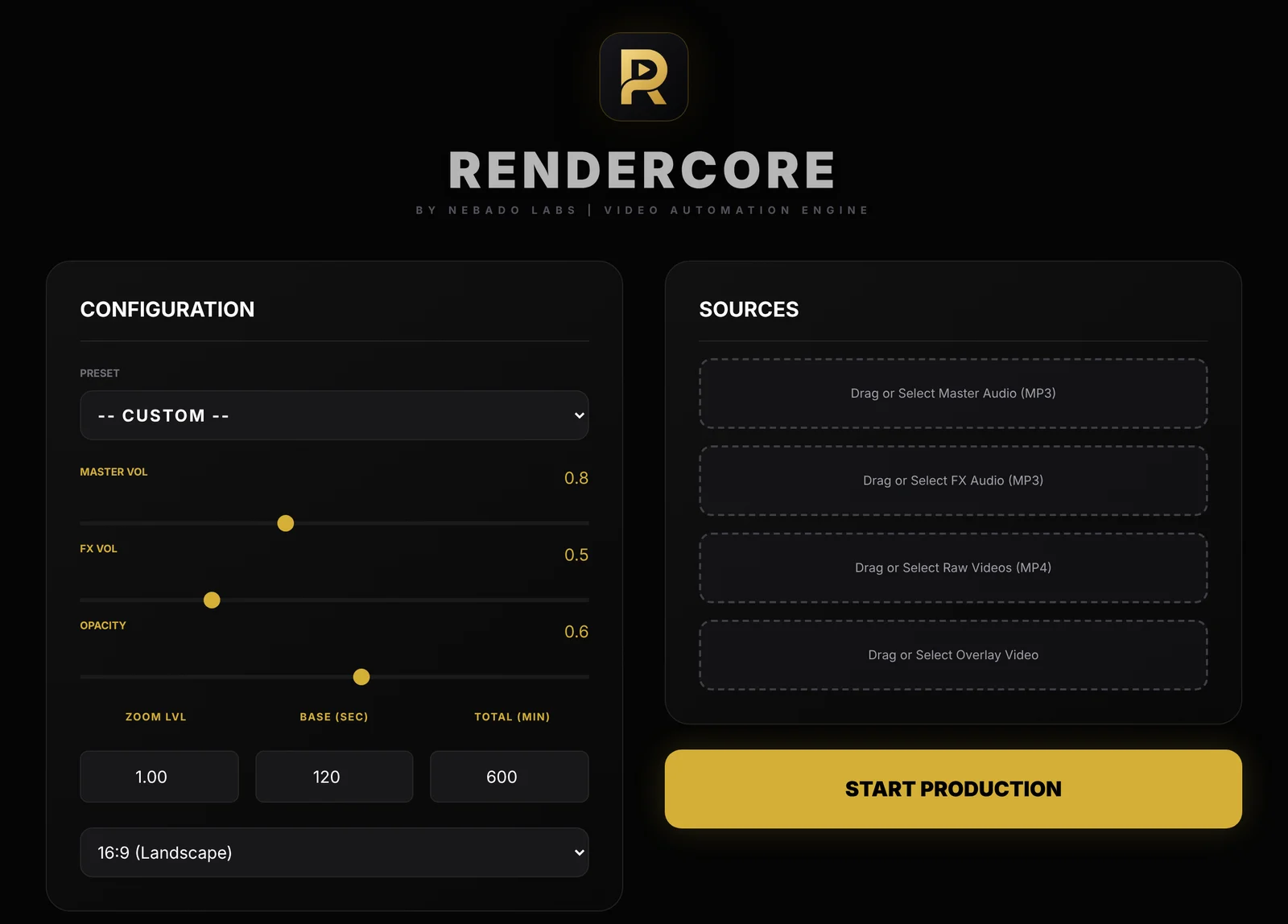
The RenderCore window: Configuration on the left, Sources on the right.
- Add your black clip under Raw Videos and your track under Master Audio. Add an FX Audio layer if you want rain or thunder under the music.
- Set Base (sec) to the length of your black clip, for example 10.
- Set Total (min) to the length you want: 480 for 8 hours, 600 for 10 hours.
- Choose 16:9 for YouTube.
- Click Start Production. The MP4 is saved in your Videos folder, in the Nebado RenderCore folder.
Title and thumbnail
- Say it in the title. Viewers search for the format, so include "black screen" or "dark screen", the sound and the length, for example "Heavy Rain Sounds for Sleeping, Black Screen, 10 Hours".
- The thumbnail can be bright. The video is dark, but the thumbnail still has to be noticed in search. Many channels use large text such as "BLACK SCREEN" with a rain or storm icon.
- Add value. YouTube's rules on repetitive content can affect monetization. Original sound mixes, consistent quality and a clear purpose (sleep, baby sleep, study) help your channel stand apart.
Try RenderCore free
No timeline dragging, no command line: pick a clip and a track, type the length, start. Every feature, no time limit. Videos made in trial mode carry a small watermark; a one-time license removes it. Windows 10 and 11, 64-bit.
Frequently asked questions
Why do people watch black screen videos?
To fall asleep with sound but without a bright screen lighting up the room. On OLED screens, black pixels are fully off, which also saves battery.
How do I make a black video clip?
Export a 10-second pure black MP4 from any video editor, for example Clipchamp on Windows 11. RenderCore then repeats it for the full length under your audio.
How long should a black screen sleep video be?
8 to 10 hours covers a full night. Many channels also publish 3-hour versions for naps and study.
Does the audio loop with the black clip?
No. In RenderCore the black clip repeats, while the master audio plays continuously from start to finish.
Is there a watermark in the trial?
Yes, trial videos show a small "Made with RenderCore" text in the corner. A one-time license removes it. On a black screen video, test whether the watermark matters for your use before you buy.