Nobody films or edits ten hours of footage for a sleep or ambient video. Channels that post 10-hour videos every day loop a short, calm clip under a continuous sound track until the video reaches ten hours. This guide shows the whole method, what to prepare and what to check before you upload.
In this guide
Why 10-hour videos?
Sleep, rain, white noise and study videos are played in the background, often all night. A viewer who starts a 10-hour video at bedtime does not have to touch the phone again until the morning, and every hour they keep it playing counts as watch time for the channel. That is why so many ambient channels publish at 8, 10 or 12 hours.
The method: a short loop, a long sound track
A 10-hour ambient video has two layers that work differently:
- The picture repeats. A short clip, for example 30 seconds of rain on a window, plays again and again.
- The sound does not restart. The audio runs from the first second to the last on its own track. If the sound jumps back to the start every time the picture repeats, listeners notice right away, and it can wake people up.
Doing this by hand in a regular video editor means copying a clip hundreds of times onto a timeline and exporting a huge project. A loop renderer does the repeating for you.
What you need
- One or more short clips (MP4). Calm scenes with steady motion repeat best: rain, a fireplace, clouds, waves, a night city view.
- An audio track (MP3). A long rain, noise or music recording. Optionally a second ambient layer, for example soft thunder.
- A Windows 10 or 11 PC (64-bit) with plenty of free disk space.
- The rights to your material. Use your own footage and audio, or content you are licensed to use. RenderCore does not include stock clips or music.
Make a 10-hour video in RenderCore
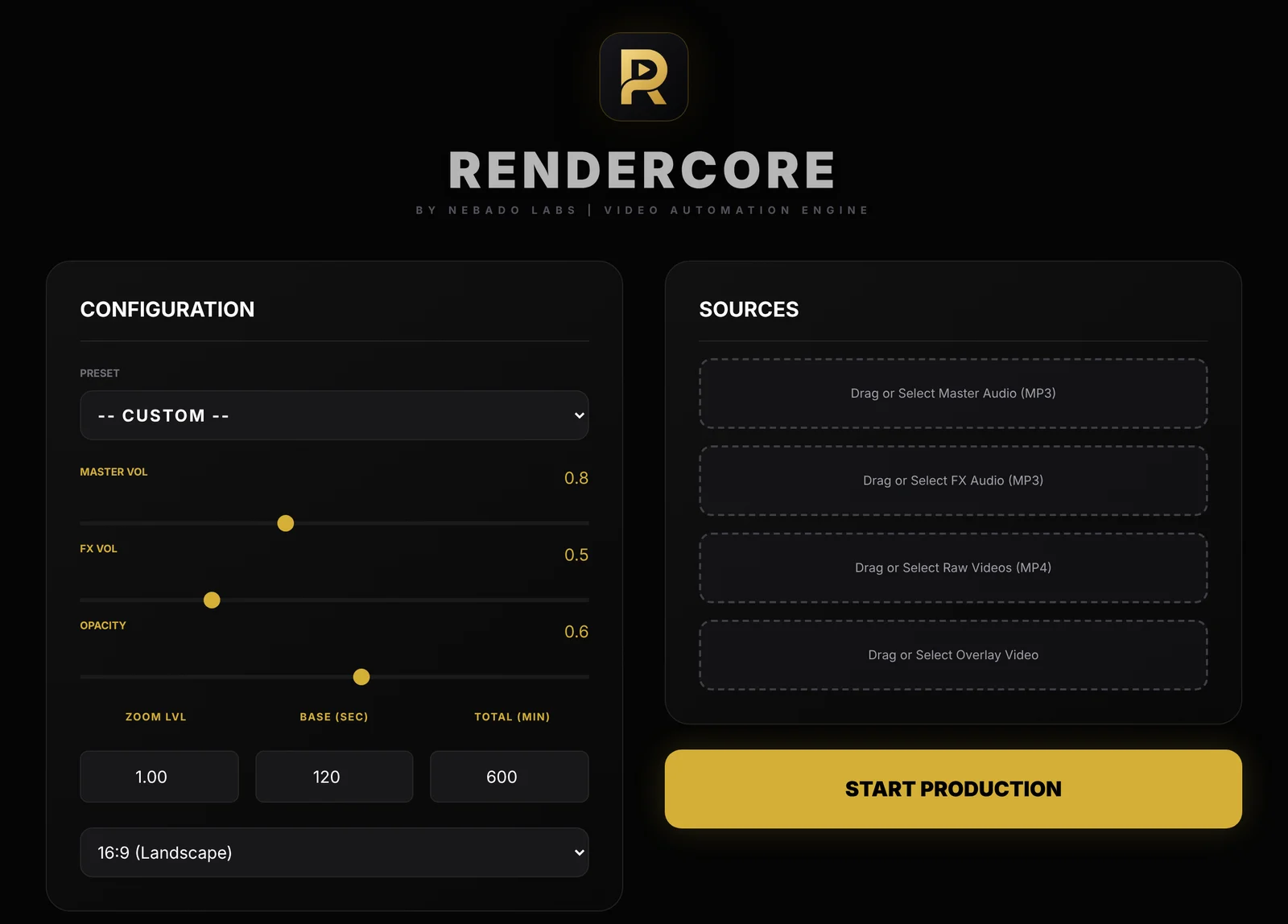
The RenderCore window: Configuration on the left, Sources on the right.
- Add your sources. Put your clip under Raw Videos and your track under Master Audio. You can add an FX Audio layer and an Overlay Video if you want.
- Set the length. Enter the loop block length in Base (sec) and the total length in Total (min). For 10 hours, enter 600.
- Pick the format. 16:9 (1920x1080) for regular YouTube videos, or 9:16 (1080x1920) for Shorts, Reels and TikTok. You can also start from a preset.
- Balance the sound. Use Master Vol and FX Vol so the ambient layer sits under the main track instead of on top of it.
- Click Start Production. RenderCore renders one MP4 on your PC and saves it to your Videos folder, in a folder named Nebado RenderCore. Everything runs offline.
File size and render time
A 10-hour file is big. The exact size depends on the bitrate, the resolution and how much the picture changes. As a rough example, video at 5 Mbit/s uses about 2.2 GB per hour, so ten hours is around 22 GB. Calm, dark or static footage usually compresses better than busy footage.
Render time depends on your processor, your graphics card and the clips you use. Your 5-minute test is the best way to estimate it: if 5 minutes take one minute to render, ten hours will take roughly two hours.
YouTube currently accepts uploads up to 12 hours or 256 GB, whichever is smaller, and videos longer than 15 minutes need a verified account. Check YouTube's help pages for the current limits before you upload.
Common mistakes
- Audio that restarts with the loop. Keep the sound on its own continuous track.
- A clip with a visible event. A bird, a car or a lightning flash in the clip becomes obvious when it repeats every 30 seconds.
- Volume that is too loud. Sleep listeners turn their volume down, not up. Mix the track quietly and avoid sudden peaks.
- Skipping the final check. Jump to the middle and the last minutes of the finished file before uploading.
- Uploading the same video again and again. YouTube's rules on repetitive content can affect monetization. Vary your scenes and sounds, and give each video a clear purpose in the title.
Try RenderCore free
No timeline dragging, no command line: pick a clip and a track, type the length, start. Every feature, no time limit. Videos made in trial mode carry a small watermark; a one-time license removes it. Windows 10 and 11, 64-bit.
Frequently asked questions
How long does it take to render a 10-hour video?
It depends on your computer and your clips. Run a 5-minute test with the same settings and multiply: the render time grows in proportion to the length.
How big is a 10-hour video file?
Often between 10 and 30 GB for 1080p, depending on bitrate and how much the picture moves. Make sure you have enough free disk space before you start.
Can YouTube take a 10-hour video?
Yes. YouTube currently allows uploads of up to 12 hours or 256 GB, and you need a verified account to upload videos longer than 15 minutes.
Does the music restart every time the clip loops?
Not in RenderCore. The picture repeats while the master audio plays continuously from start to end.
Is RenderCore free?
The trial has every feature and no time limit. Trial videos carry a small watermark, and a one-time license removes it.