Make the
ten-hour
video.
RenderCore builds 1 to 10+ hour loop videos for sleep, rain, meditation and study channels. No timeline dragging, no command line: pick a clip and a track, type the length, start. It runs on your own PC, with no uploads and no monthly fees.
Free trial: all features, no time limit. Trial videos carry a small watermark. For Windows 10 and 11 (64-bit).
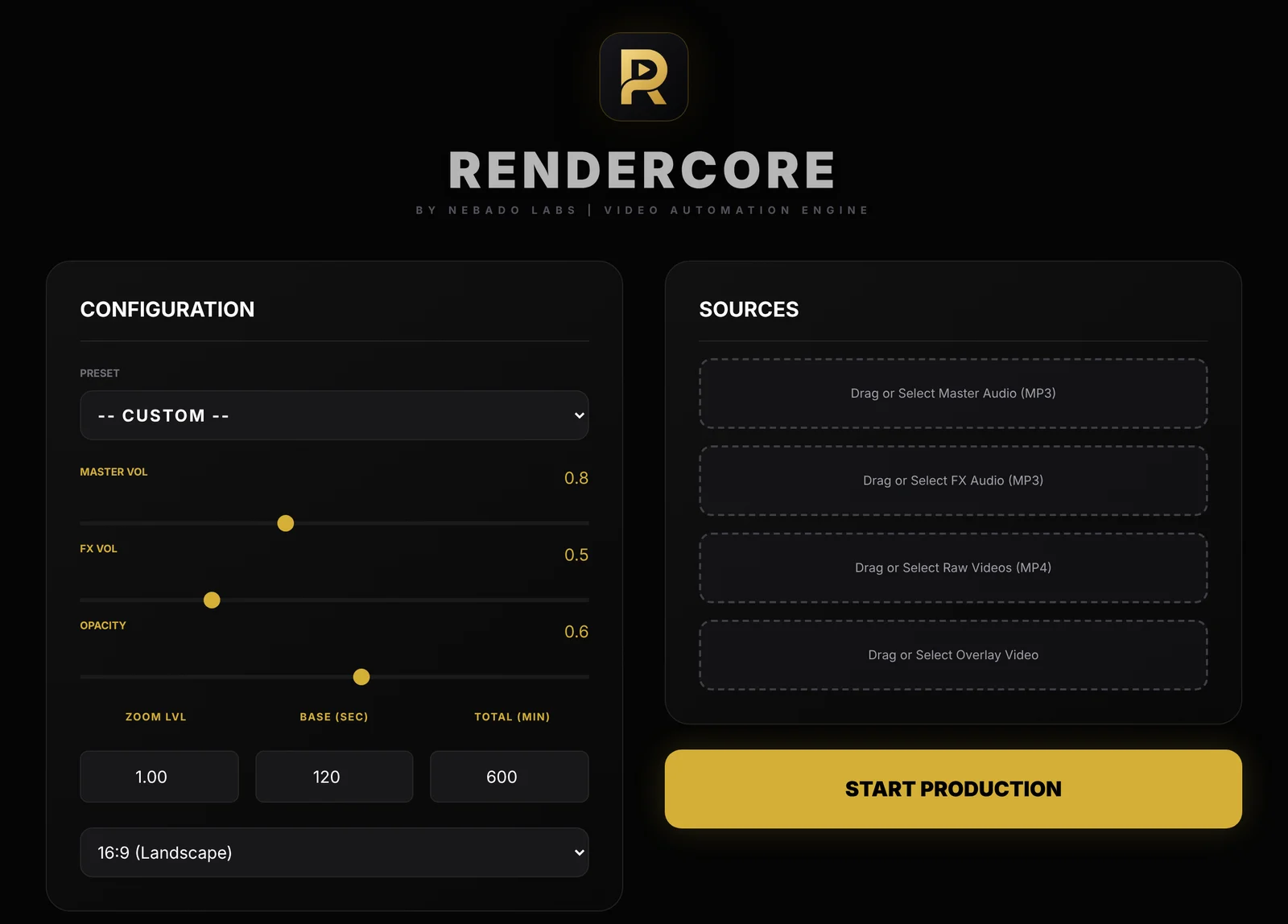
Three steps from clip to finished video
Add your sources
Drop in your background clips (MP4), your music track, an optional ambient sound layer and an overlay effect.
Set length and format
Choose how long the loop block is and how long the final video should be: 16:9 for YouTube or 9:16 for Shorts, Reels and TikTok. You can also start from a preset.
Start production
RenderCore renders the complete video on your PC. The visual block repeats seamlessly while your music plays from start to finish.
See RenderCore in action: from a short clip to a long meditation video.
Why not just use a video editor?
You can make a 10-hour video in any editor. This is what it takes with a 30-second clip.
In a timeline editor
Copy, paste, repeat
- Import the clip and the music.
- Paste the clip about 1,200 times to fill ten hours.
- Line up the music, fix gaps and jumps.
- Export a very heavy project, and start over to change the length.
Hours of dragging on the timeline.
With FFmpeg
Free, if you like the command line
ffmpeg -stream_loop -1 -i clip.mp4 -i music.mp3 -map 0:v -map 1:a -t 36000 -c:v libx264 -c:a aac out.mp4
- Install it and learn the options.
- Rewrite the command for every length, format and layer.
Powerful, but every change means editing the command again.
With RenderCore
Pick, type, start
- Pick your clip and your track.
- Type the length: 600 minutes for ten hours.
- Click Start Production.
Music plays straight through, the picture loops, one MP4 comes out. Offline, one-time license.
Built for long-form ambient channels
Everything you need to publish long videos regularly, without a timeline editor or a cloud subscription.
Any length
From a few minutes to 10+ hours, exported as a single MP4 file.
Uninterrupted music
Your track plays all the way through. It is never cut at the loop point and only restarts when the song ends.
Two audio layers
Mix music with an ambient layer such as rain, waves or fire, with separate volume controls.
Overlay effects
Layer rain, particles or light effects over your footage with adjustable opacity and zoom.
Landscape and vertical
1920×1080 for YouTube or 1080×1920 for Shorts, Reels and TikTok.
100% offline
Rendering happens on your computer. Your files are never uploaded and no account is needed.
Presets included:
- Midnight Rain & Sleep
- Zen Meditation Space
- 888Hz Abundance Aura
- Vertical Shorts
Try everything first. Pay once.
The trial is the full app. A license removes the watermark and unlocks nothing else, because nothing else is locked.
- All features and presets
- Any video length
- Landscape and vertical output
- Small “Made with RenderCore” watermark
- Everything in the trial
- No watermark
- Activate with your order number, no restart needed
- Works offline after activation
Guides
Make an 8-hour rain video for sleep and focus channels: clip, audio and render settings.
Read the guideHow to build a loop that runs for hours without a visible jump or a restarting soundtrack.
Read the guideThe method behind 10-hour sleep and ambient videos: a short loop, a continuous sound track, file size and render time.
Read the guideMake a dark screen rain or music video for the whole night, from the black clip to the title.
Read the guideChoose a fire clip that loops, build the crackling sound and render 3 to 10 hours.
Read the guideLoop a short clip under a 1-hour mix or playlist without cutting the audio.
Read the guide1, 3, 8 or 10 hours: what each length is for and how to check your niche.
Read the guideMeasure demand and competition with views per day and find open ground.
Read the guideResearch rain, sleep and ambient video niches on YouTube: views-per-day badges, a length filter and an open-niche finder. Free, runs in your browser.
Get it on Chrome Web StoreQuestions
Do I need an internet connection?
No, rendering is completely offline. An internet connection is only needed once to activate a license; after that RenderCore keeps working without it.
Is it a subscription?
No. You buy a license once through our Etsy shop and keep using it. There are no monthly fees.
What is the difference between the trial and the full version?
Only the watermark. The trial has every feature and no time limit; videos made in trial mode show a small “Made with RenderCore · nebado.com” text in the corner. After you activate a license, new videos have no watermark.
How do I activate my license?
Open RenderCore, click Enter license key and paste your Etsy order number or license key. The watermark is removed right away, without reinstalling or restarting.
Windows says “Windows protected your PC”. Is it safe?
This message appears for new apps from independent developers that Windows does not recognize yet. Click More info and then Run anyway to install. RenderCore does not upload your files anywhere.
What are the system requirements?
Windows 10 or 11 (64-bit). Render speed depends on your processor. Long videos are large files, so make sure you have enough free disk space for the length you choose.
Can I monetize the videos I make?
RenderCore does not add any claim to your videos. It does not include stock footage or music, so make sure you have the rights to the clips and audio you use.